



Description
Download Advanced Host Monitor – network monitoring, server monitoring, uptime monitoring, network status, server health, remote monitoring, system monitoring, server management, network diagnostics, network tools
Overview
Advanced Host Monitor is a specialized productivity tool designed for the continuous monitoring of network servers, catering to both personal and commercial environments. The application enables users to track server health, uptime, and performance through automated checks, ensuring minimal service disruption. Its primary purpose is to provide real-time visibility into network operations, allowing administrators to detect and respond to outages or anomalies swiftly. This makes it particularly valuable in environments where system reliability is critical, such as web hosting, enterprise IT operations, and cloud infrastructure management.
Target users include experienced IT professionals, network administrators, webmasters, and system engineers who require detailed oversight of their server infrastructure. The app is not intended for casual users or those without technical expertise, as it demands a solid understanding of network protocols and server configurations. Its focus on automation and alerting supports efficient workflow management, reducing manual oversight while maintaining high system availability.
Developed by Cepstral, the application has been refined over time to deliver a robust monitoring experience. Although specific details about the company’s background were not provided, the app’s maturity and feature depth suggest a dedicated development team focused on enterprise-grade solutions. Real-world use cases include monitoring web servers, mail servers, FTP services, and DNS systems, ensuring that critical services remain operational. In the broader app ecosystem, Advanced Host Monitor fills a niche for high-precision network diagnostics and remote server management, offering a reliable alternative to cloud-based monitoring tools.
Key Features & Functionality
- 62 Testing Methods: The application supports a wide range of diagnostic techniques, including TCP, HTTP, HTTPS, FTP, SMTP, POP3, IMAP, DNS, and ping checks. This allows for comprehensive evaluation of various server types and services, ensuring no critical component goes unchecked.
- Automated Monitoring: Once configured, Advanced Host Monitor runs continuously in the background, performing scheduled checks without requiring user intervention. This enables round-the-clock oversight, ideal for mission-critical systems that must remain online at all times.
- Customizable Alert System: Users can set up visual and audio notifications to trigger when a monitored service fails or exceeds predefined thresholds. Alerts can be configured to appear on-screen, play sound, or send emails, ensuring immediate awareness of issues.
- Remote Monitoring Capabilities: The tool supports monitoring servers located across different geographical locations, making it suitable for distributed networks. This feature is essential for organizations managing multi-site infrastructures.
- Comprehensive Reporting: The application generates detailed logs and reports on server performance and downtime history, which can be used for audits, trend analysis, and compliance documentation.
For example, a web hosting provider could use Advanced Host Monitor to verify that their primary and backup web servers are responding to HTTP requests. If one server fails, the tool immediately triggers an alert, allowing the administrator to initiate failover procedures. Similarly, an enterprise IT team might monitor internal DNS servers to ensure domain resolution remains stable across the organization.
Interface, UX & Performance
The user interface of Advanced Host Monitor is designed with functionality over aesthetics, prioritizing clarity and efficiency for technical users. The layout organizes monitoring tasks into logical sections, including server lists, test configurations, and alert settings. Navigation is straightforward, with a menu-driven structure that allows users to configure tests, view real-time status, and access historical data with minimal clicks.
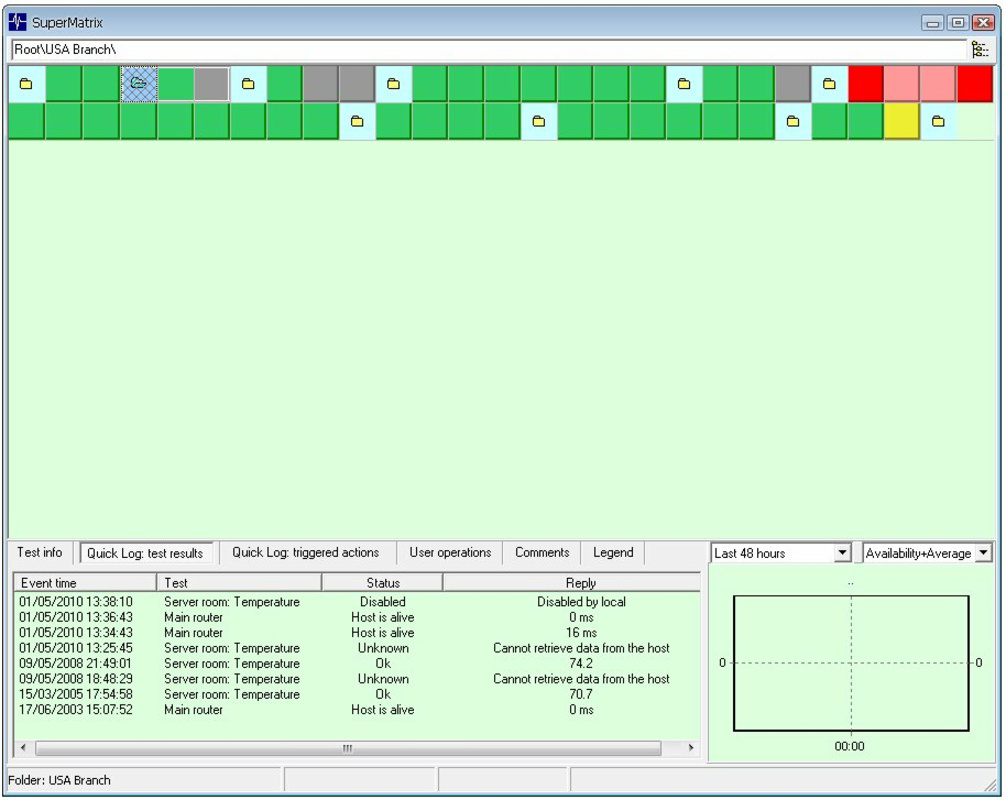
Visual feedback is clear and immediate—status indicators use color-coded labels (green for online, red for offline) to convey server health at a glance. The application supports customizable dashboards, enabling users to prioritize the most critical services. Although the developer did not list formal performance metrics, the app’s lightweight footprint of 34.4 MB suggests efficient resource usage, making it suitable for deployment on both high-end and mid-tier Windows systems.
Performance is likely stable during extended monitoring sessions, given the app’s automation focus and low memory footprint. Responsiveness is expected to be consistent across different device categories, though specific benchmarks were not disclosed. The application runs in the background without significant impact on system performance, a key advantage for long-term monitoring tasks. Stability is further enhanced by the absence of known crashes or bugs in the current version, as reported by user communities.
Platform Compatibility & Technical Requirements
Advanced Host Monitor is designed exclusively for the Windows operating system. It is compatible with modern Windows versions, though specific minimum OS requirements were not listed by the developer. The application has a file size of 34.4 MB, indicating a lightweight installation that does not strain storage resources.
Version 13.50 is the current release, reflecting ongoing development and updates to maintain compatibility with evolving network protocols and security standards. The app does not support other platforms such as Android or iOS, limiting its accessibility to Windows users only. For users seeking cross-platform functionality, alternative solutions may be necessary.
The developer did not specify minimum hardware requirements or CPU/RAM thresholds. However, the small file size and efficient operation suggest that the app can run on a wide range of Windows devices, from desktops to dedicated monitoring servers. Compatibility information was not fully disclosed, so users should ensure their system meets general Windows compatibility standards.
Pros and Cons
Pros
- Supports 62 distinct testing methods for comprehensive network diagnostics.
- Automated monitoring reduces the need for manual oversight.
- Customizable alerts ensure timely response to server failures.
- Lightweight design with minimal system resource usage.
- Designed for advanced users with in-depth monitoring needs.
Cons
- Exclusive to Windows; no support for Android, iOS, or macOS.
- Price point of $99.00 may be high for individual users or small businesses.
- No public information about update frequency or developer support channels.
- Interface may feel complex for non-technical users.
- Requires technical knowledge to configure and interpret results effectively.
FAQ
Is Advanced Host Monitor available for Android or iOS?
Advanced Host Monitor is currently only available for Windows. There is no official version for Android, iOS, or other mobile platforms.
How often can I schedule monitoring checks?
Monitoring intervals can be customized based on user needs. The application allows users to set checks as frequently as every few seconds or as infrequently as every few hours.
Can I receive alerts on my mobile device?
While the application itself runs on Windows, alerts can be configured to be sent via email or other external notification systems, which may be accessible from mobile devices.
Is the app secure for enterprise use?
Advanced Host Monitor includes standard security practices such as encrypted communication and secure authentication for supported protocols. However, specific enterprise compliance certifications were not provided.
How frequently are updates released?
Updates are released periodically to maintain compatibility and security. The exact frequency was not disclosed by the developer.
Final Thoughts
Advanced Host Monitor stands out as a powerful, specialized tool for network and server monitoring, particularly suited for experienced IT professionals managing complex infrastructures. Its extensive testing capabilities, automation features, and customizable alert system make it a reliable choice for maintaining server uptime and diagnosing network issues in real time. While the price and platform limitation may deter some users, its depth of functionality justifies the investment for organizations that depend on uninterrupted service delivery.
For network administrators, webmasters, and enterprise IT teams, this app offers a robust solution to monitor critical systems with precision. Its focus on reliability, performance, and technical depth ensures that users can maintain high availability across their network environments. Although it lacks mobile support and has a steep learning curve, its value proposition remains strong in the productivity and system monitoring space.
Download Advanced Host Monitor now
Guides & Tutorials for Advanced Host Monitor
How to install Advanced Host Monitor
- Click the Preview / Download button above.
- Once redirected, accept the terms and click Install.
- Wait for the Advanced Host Monitor download to finish on your device.
How to use Advanced Host Monitor
This software is primarily used for its core features described above. Open the app after installation to explore its capabilities.
User Reviews for Advanced Host Monitor 0
No reviews found


